Platform capabilities

The capabilities behind your agents.

Explore what mAIvn does, from the first Python function to a run you can inspect. Open the developer details when you want the API behind a feature.

Inside mAIvn Studio
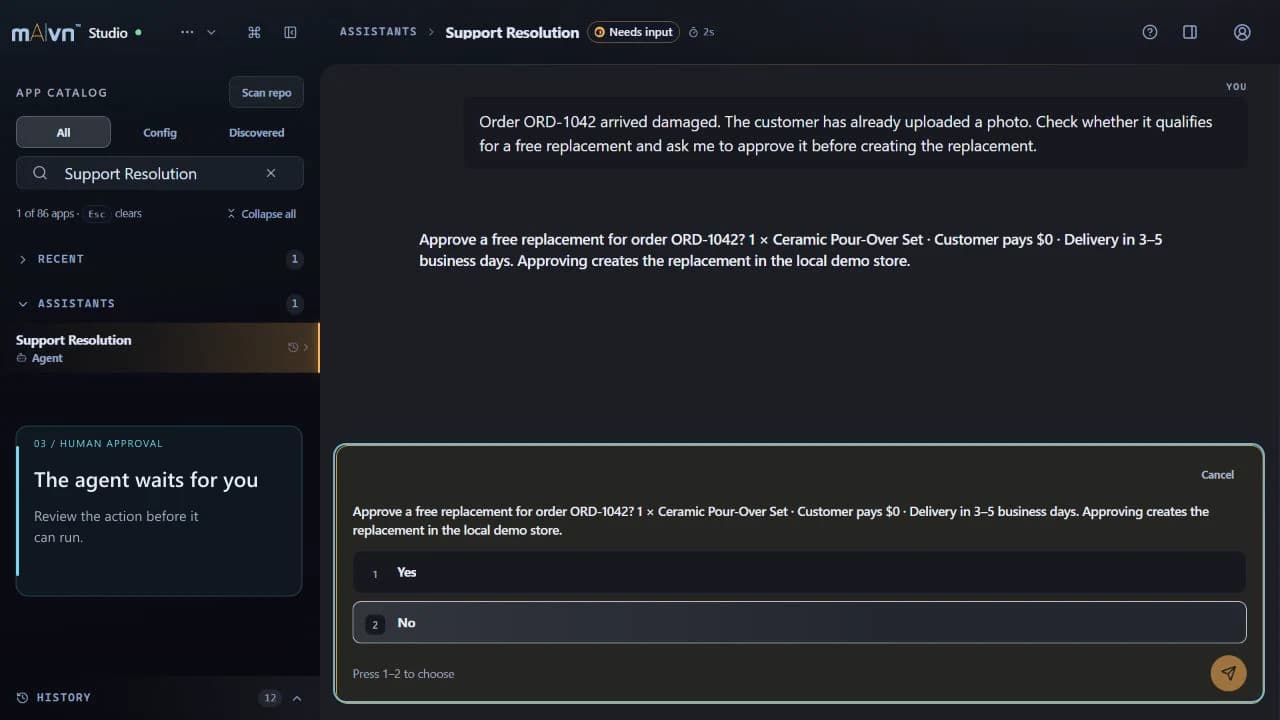
Pre-recorded Support Resolution walkthrough showing the example paused at a human approval step, asking whether to approve a replacement orderWatch the approval workflow
Recorded walkthrough with sample orders. A person approves before the agent acts.

Build

Write agents in ordinary Python

Your team builds agents with the code they already write, so there is nothing new to learn before the first one runs. Ordinary functions become tools an agent can use, with no diagram to draw and no wiring to fill in by hand.

Any function becomes a tool

Add one line above a normal Python function, or above a typed Python model, and an agent can use it. Everything the agent needs to know about it comes from the type hints you already wrote.

Your code stays yours

Only a tool's name, its description and the kinds of values it takes ever leave your systems. The code itself runs where you run it.

Teams of agents

Put several specialists together into one team you call exactly like a single agent, and say plainly who hands work to whom.

Say what depends on what

Tell the platform which tool feeds which. Work that can happen at the same time does, work that has to wait waits, and you write none of that scheduling yourself.

Results in the shape you defined

Get data back in the shape you defined, already checked, or a clear explanation of why it could not be produced. You never have to repair a half-formed answer by hand.

Big, detailed results still work

Deeply nested results come back complete on every model we support.

Write know-how as notes

Save reusable instructions as plain Markdown files and group them into sets. Attach a set to an agent, or let the right set be chosen for each run.

Every tool says what it touches

Each tool carries a written list of what it is allowed to touch, and a flag when it can destroy something. What an agent can reach is declared, not assumed.

Run your own checks around calls

Slip your own code in immediately before and after any tool runs, for logging, policy checks, or anything else you need in the path.

Fits a script or a service

Every way of calling an agent comes in two forms, one that waits for the answer and one that gets on with other work, so the same code suits a small script and a busy web service.

Run many inputs at once

Push a whole list of inputs through one agent and compare the results side by side, from your own code or from Studio.

Test without leaving your machine

Call your tools straight from your test suite and inspect exactly what an agent would be told about them, standing in for only the remote part. Tests stay fast and give the same answer every time.

Python 3.10 and up, typed throughout

The toolkit you install, the SDK, needs Python 3.10 or newer. Everything you pass in and get back is typed, so your editor and your tests catch mistakes before a run does.

Choose

Picking the right model for the job

Nobody on your team has to keep up with every new AI model to get good answers at a sensible price. Ask for the outcome you want, and the platform picks a model to match, switches when one falters, and writes down what it chose.

The right model, chosen for you

Leave the model unset and each request goes to one that suits it. Routine work stops costing you top-of-the-range prices.

Ask for fast or best

Choose fast, balanced, max, ultra or automatic instead of naming a particular model. When you need the identical model every single time, name one.

Different models for different steps

Use one model for the answer, another for thinking a problem through, and others again for planning, writing code or filling in a complicated tool call.

Lean toward speed, cost or quality

Nudge the automatic choice in the direction you care about, without having to make the decision yourself.

How hard it should think

Set how much thinking a request gets, from barely any to a great deal. If a provider does not offer the depth you asked for, the nearest one it does offer is used instead of the call failing.

One way to call every provider

Anthropic, Google, OpenAI and more all work the same way in your code, with picture generation wherever a provider offers it. mAIvn keeps adding new models as they come online, with no change on your side.

Write it once, it works everywhere

Thinking settings, length limits, insisting on a particular tool and the shape of the result all behave the same on every model, even where the providers themselves disagree.

Keeps going when a provider fails

If a provider slows to a crawl or goes down, the work carries on with another one. You do not write the retry.

Notices when a provider goes quiet

A provider that stops responding is spotted and swapped out, rather than left to keep your request hanging.

Reuses what it already read

When a conversation keeps repeating the same background material, the provider is asked to reuse it. Long conversations cost less and start answering sooner.

The model list cannot change quietly

The list of models, what each one can do and what each one costs is versioned, so it cannot change quietly underneath you.

See which model actually answered

When the platform chooses for you, the record of the run says which model served the request and what kind of work it was matched to.

Never pretends to read a file

Pictures, documents and video only go to models that can genuinely take them in. Nothing answers as though it had read a file it never saw.

Knows the date where you are

Agents always know today's date and the local time for the person they are working for.

Run

How agents get work done

This is the part most teams underestimate: deciding what runs when, catching work that has gone wrong, and staying inside a budget. It comes with the platform, so nobody on your side has to build it.

Does several things at once

Work that does not depend on anything else runs at the same time, and work that does runs in order. You say what depends on what; the platform arranges the rest.

Every run can be walked through

Every step of a multi-step run keeps a stable identity, so a finished run can be stepped through afterwards, exactly as it happened.

Side tasks stay in their lane

A smaller task inside a bigger one can be given its own tools, its own budget and its own view of the data, so one part of the work cannot reach into another.

Team plans are checked first

When several agents work together, their plan is checked before anything runs. A plan that does not hold up falls back to a safe one instead of failing the whole job.

Ends with the step you chose

You can insist that a run finish by calling one particular tool, so the last thing an agent does is always the thing you asked for.

Tries harder once, then stops

When something keeps failing, the work moves up to a stronger model one time and then finishes. A struggling run cannot quietly spend your whole budget.

Tell it when to re-plan

Mark the places where an agent has to pause and think again, instead of letting it carry on with a plan that is already out of date.

Useful tools already included

Web search, a safe place to run Python, a focused deep-thinking pass and help filling in complicated tool inputs are all there from the start, with nothing to set up.

Offers only the tools that fit

Accuracy holds up as the number of tools you have grows, and you can narrow the set yourself for any one run.

Budgets checked before you spend

A budget is checked before a call goes out, rather than discovered on the bill afterwards.

Protect

Keeping private data private

If your work touches customer records, payment details or medical information, this is the section to read. Values you declare, and supported values the safety scanner detects, are replaced before configured model requests. Approved tools and final responses can receive restored values; tools, outputs, logs, customer storage and file custody need their own controls. On supported desktops, the SDK saves caller-declared values in an encrypted local vault when an OS credential store is available.

Labels instead of real values

An agent works with the name and the kind of a sensitive value, a card number for instance, and never with the number itself.

Approved tools can use real values

A tool you configure can receive the true value at the moment it runs. Tool arguments, results and logs still need the access and retention rules you choose for that tool.

Your customers see the real thing

Authorized final responses can restore protected values before the person reading them receives the answer. Multi-turn work also needs thread custody for its placeholder map, so retention follows the configured store and lifecycle.

Catches secrets you did not declare

Sensitive details that turn up unannounced in a tool's result, such as card numbers, account numbers, bank details and people's names, are recognized and taken out before the model ever sees them.

Finds values a tool reshaped

A value that a tool splits up, reorders or writes out differently is still recognized, and still removed.

Say what is safe to share

List the things you are happy to pass along. A stricter setting refuses a list that would give away a sensitive category.

A record of every access

For any session, see every time a sensitive value was used and which step used it.

What it remembers stays clean

Anything an agent learns and keeps is stored without sensitive values inside it, so remembering cannot leak what was removed.

Thread custody is explicit

A multi-turn run needs its placeholder map to continue. On supported desktops, the SDK saves caller-declared values in an encrypted local vault when an OS credential store is available. You can configure the store or disable persistence.

Preview what will be removed

Check exactly what would be taken out before you send anything at all.

Attachments are cleaned too

Files are stripped of sensitive detail before any model sees them, and every time a real value is put back the record shows where it came from.

Faces and text blanked in images

Sensitive writing and faces are removed from images, not only from text. If the cleaning cannot be trusted, the file is held back rather than passed on.

Monitoring feeds carry no content

Run history keeps the conversation so you can replay it, with private values left out. The feed you send to your own monitoring is different: it holds labels and counts only, and there is nowhere in it to put a prompt or an answer.

Local vault components exist

The local vault core encrypts value maps and documents on your machine. The SDK sets up storage for caller-declared placeholder values on supported desktops; private-file custody remains a separate API.

Local purge has a boundary

The local vault can purge its active ciphertext records. That does not prove deletion from backups or from every outside system that received a copy.

Connect

Connecting the systems you already use

An agent is only as useful as the systems it can reach, and reaching them should not become a project of its own. Adding one is an import in your code, not an integration effort.

170+ connectors

One optional package brings 170+ ready-made connections. It covers AI services, search, databases, analytics, data pipelines, chat, email, documents, developer tools, infrastructure, sign-in, customer records, commerce, finance, staffing, service desks, social tools, and automation hubs.

Connect to almost any web service

Point at a web address, at a published description of a service, or at a single operation, and you get tools you can call. The usual kinds of web interface are covered, with no generated code to keep in step.

Works with open tool servers

Attach any server that speaks the Model Context Protocol, an open standard for connecting tools to AI, over a local link or the web. Its tools then behave like your own, errors and run records included, and anything that looks like a password stays hidden from the model.

Sign-in handled for you

Keys, tokens, usernames and the common sign-in handshakes are all taken care of. When a connection needs signing in again you get a clear signal, so your own screens can ask at the right moment.

Handles busy services and long lists

Backing off politely when a service is busy, staying under its limits, and walking through long lists of results are built into every connection, rather than rewritten for each one.

Preview a change before it happens

See what a write would do before it does it, so anything destructive gets reviewed rather than discovered.

Connect once, reuse everywhere

Link a project to chat, code hosting, email, databases, incoming events, forms, or local files once. Do it in the Portal or from the command line.

Automate

Work that starts itself

Most of the value arrives when nobody has to press anything: work begins on its own and the answer turns up where your team already works. It also cannot run away with itself, fire twice, or flood you.

Many ways to start a run

Work can begin on a timetable, at the press of a button, or when an email arrives for an agent. It can also start from a signed message, another run finishing, an event in a connected service, something being saved or remembered, a reply in a thread, or an agent deciding to start one itself.

Answers land where you work

Results go to your chat, a comment on your code, an email reply, a record in your database, a web address of yours that we call, a file, or the app itself. Delivered once.

Repeating work, spread out

Runs that repeat are staggered so they do not all fire at once, and after an outage they pick up cleanly instead of replaying everything they missed.

Nothing gets dropped

Incoming events are accepted the moment they arrive and stored safely. A restart does not lose them.

Sending it twice runs it once

The same event arriving twice never does the work twice, and a tampered-with copy is refused outright.

Cannot spiral out of control

An automation cannot set itself off in a loop, one event cannot snowball into a flood, and a failing connection is cut off before the trouble spreads.

Says why it did not run

An event that does not lead to a run says exactly why, by name, instead of quietly disappearing.

People come before background jobs

Automated work in the background cannot crowd out someone waiting on an answer right now.

Your own rules for trying again

Decide for each automation how often to retry and how long to wait between attempts. Work that runs out of attempts lands somewhere you can look at it and send it through again.

A retry uses the same version

Work that is tried again uses the version of the agent that first received the event, so a release in the meantime cannot change the answer.

Messages we send are signed

Every message we post to a web address of yours is signed and stamped with the time, so your systems can check that it really came from us.

Cannot be aimed at your internals

Outgoing deliveries are blocked from reaching addresses inside a private network.

Runs inside your own network

Serve agents from your own machines without opening a single incoming port. Work is picked up rather than pushed in, so the same job cannot run twice.

Test incoming events on your laptop

Point a real outside service at code running on your own machine, through a temporary secure link.

React to files on your machine

Send signed notices when files change on a computer you control, without putting that computer on the internet.

Produce

Real files in, real files out

The work you care about usually lives in documents, spreadsheets and scans rather than in tidy text. Agents can read those files honestly and hand back finished ones.

Send files agents can read

Attach text, pictures, documents, or video to any message. The agent works from what is genuinely in the file.

Choose how carefully files are read

Pick speed, or a tidied-up version you can navigate, or the careful setting, which strips sensitive detail out of both the words and the pictures before any outside model sees the file.

Messy formats become clean text

Documents, spreadsheets, exported data, web pages and plain text all come out as consistent, readable text, and spreadsheets keep their rows and columns.

Reads scans, listens to recordings

Text is read out of scanned pages and photographs, and audio and video are written out as text. A page that cannot be read is reported as unreadable, never invented.

Broken files still come through

A partly corrupted document still comes through readable instead of ruining the whole run.

Reads long documents section by section

Rather than cramming a whole document in at once, agents move through it section by section, and every answer points at the part it came from.

Hands back finished documents

Agents produce word-processor files, PDFs, slide decks, spreadsheets and pictures. They are built the same way every time, and you can look at them in Studio before they go anywhere.

Makes and edits pictures

Create and edit images without tying yourself to one provider, with a safety setting you choose rather than inherit.

Every file has a paper trail

Every file an agent makes is traceable to the step that made it, and is handed over only once it is complete.

Your own tools can return files

A tool you wrote can hand a file straight back. There is nothing extra to build on our side of the line.

Keep reference documents on hand

Upload the documents your agents refer to, swap them, restore them, clean them again, and reuse them across runs.

Remember

Memory, and a place for a person to decide

Some work spans days and several people, and some of it should not happen until somebody signs off. Agents carry what they have learned, ask a question when they need one answered, and wait.

Conversations that carry on

One conversation keeps its context from one turn to the next, with plain controls if you would rather manage that yourself.

Decide how much it remembers

Choose anything from remembering nothing at all to full recall, and decide whether that memory belongs to one agent, a team, a project, or the whole organization.

Gets better with use

Agents pull reusable lessons and know-how out of their runs, and you decide what is worth keeping, in the Portal or from your own code.

Learning never slows the answer

The work of learning happens after the answer has already gone out, and it still shows up properly in your usage.

Tells you where it learned that

A remembered fact carries its origin, so you can see which run taught it.

Rules for what memory is kept

Set a memory policy for the whole organization and how long things are kept, and clear memory with a record of exactly what went.

A person signs off first

Stop a run for someone to decide before a tool does anything, then carry on from exactly where it stopped.

It asks when it is unsure

Agents can ask a proper question, from yes or no to pick one, pick several, write something, or fill in a short form, and then pick up precisely where they paused.

Rewind and take another path

Rewind a conversation to an earlier turn and take it in a different direction, without losing the original.

Stop it mid-run

Stop a run while it is still going, rather than waiting for work you no longer want.

Observe

See exactly what happened

When an agent gets something wrong, the question is always the same: what did it actually do? Every run is watchable while it happens and inspectable afterwards, in our apps or in yours.

Watch it work, live

Text, tool calls and progress markers appear as they happen. Lose your connection part way through and you pick up again with nothing missed and nothing repeated.

A full record of every step

A searchable tree of every model call, every tool call, every switch to another provider and every helper agent, with how long each one took and how much it used.

What each step cost

See the cost of each step of a run, charged against the model that really served it rather than the one you asked for.

Send records to your own tools

Feed run records into the monitoring you already use, through OpenTelemetry, the open standard for tracing. Sensitive values are left out by the shape of the record itself.

Show progress in your own app

Let your users watch an agent work inside your product. It is one line in FastAPI, with ready-made bridges for Flask, ASGI, aiohttp and Django, and building blocks for whatever your front end is written in.

Studio, on your own machine

Scan a project, run any agent, read the record, answer its questions, run batches and compare them, schedule work, browse the files it produced, and replay or branch through history. The first sample run needs no network at all.

The Portal, in your browser

Runs and conversations with their records, spend by model, agent, project and key, your most expensive runs, invoices, teams, keys, connections, delivery history, memory curation, and documentation with an assistant built in.

Documentation that cannot go stale

The reference for our interface is generated from the running service, so it cannot drift out of date.

Says when it does not know

When the platform cannot tell whether something finished, it records that it does not know rather than guessing, and never charges you twice to settle the question.

Operate

Team and usage controls

Set access for each project and see where usage comes from. Choose how additional capacity is purchased when a project reaches its limits.

Who can do what

Use owner, admin, member, or viewer roles. Invite people by email and set membership for each project.

Keys you can take back

A key is shown once, listed afterwards with most of it hidden, stamped with when it was last used, and switched off everywhere within seconds.

Usage limits and optional reloads

You are warned as you approach a limit and stopped when you reach it. Buy extra capacity or opt into automatic reloads, available at general availability. If a limit is missing, work is refused.

Usage by project and API key

Break down usage by project and API key, then export the figures as a spreadsheet through the API.

Start

Where to begin

You can try this in an afternoon, from wherever you already work. There is nothing to deploy and nothing to buy before the first run.

Up and running quickly

Install the package, mark one function, and call your first agent. There is nothing to deploy before the first run.

From your terminal

Serve agents, open a temporary link for testing, watch local files, manage connections and launch Studio, all from one command.

Run it all locally

Studio runs, records and replays your agents on your own computer, and its first sample run works with no network at all.

Everything in a browser

Sign in to the Portal to run agents, read the records, connect systems, invite your team and handle billing.

Guides and working examples

Written guides, a complete reference and runnable examples you can paste straight into your own project.

See it working end to end

Guided demos show tools, private data, teams of agents, approvals, structured answers and work running in parallel, all together in one place.

Know the boundaries

Private-data controls need deliberate configuration. They do not replace your compliance responsibilities.

Privacy control, not certification: mAIvn holds no SOC 2, HIPAA, ISO 27001, or FedRAMP certification. Use it at your own risk under the Platform Disclaimer.

Automatic detection of sensitive data is a safety net, not a guarantee of complete coverage. Declare the values that matter to you rather than relying on detection alone.

The SDK supports automatic encrypted local placeholder storage on desktops with an available OS credential store. Headless use needs an explicit secret or configured credential backend. Hosted managed vault custody is not available.

Eligible organizations can enable automatic reload when billing is enabled and a payment method is saved. Confirm availability and limits in your Portal. Storage and concurrent-job limits shown in plan details are not yet enforced.

Write a function. Run an agent.

Start with one task. Follow the setup guide, then use the API reference as you build.